Friday, March 2, 2018

Create your first angular 5 application

Prerequisites 
Install Angular js and Node js 

If you have already installed verify it by using the following command in command prompt

  •   ng-v and node-v 

Install angular using the following command 

  •   npm install -g @angular/cli

To verify your installation try the following command

  • ng -v
The out put screen will look something like this


Its time to start new angular5 project.
move to your folder where you want to create new app and type the following command
  • ng new MyFirstAngular5App
Open your project in browser
  • ng serve --open
If its not opening automatically type the following url in browser
  • http://localhost:4200/
If you get the following error 
"You seem to not be depending on "@angular/core". This is an error."
This means npm not get installed properly/globally in your system.
To resolve this error move to the project folder in command prompt and type the following command 
  • npm install 
You can see the following status in command window, that represents the project status
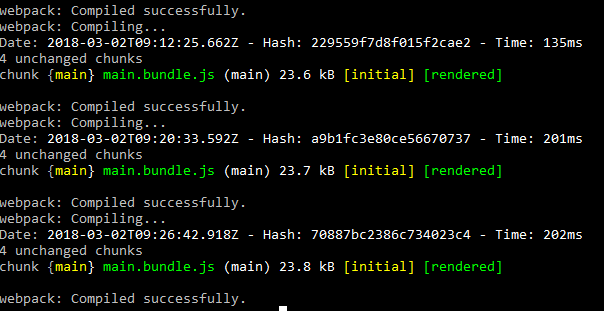

Edit the project
Open file in MyFirstAngular5App/src/app/app.component.ts.
you can use visual studio code or notepadd++ for editing the code.
you can download visual studio code from  here.


Update the title.You can see something like the following 
Note:It should be automatically update the title with out refreshing the browser


You have done it. Happy coding!

My next post will cover more about angular module,directive and components
Thank you for reading!

Friday, January 28, 2011

How to find duplicate values in a table

SELECT name,email

FROM users

GROUP BY email

HAVING ( COUNT(email) > 1 )

Dynamic where condition,sorting and paging using stored procedure in sql server

CREATE PROCEDURE [HR.Reports].[EmployeeList]

@Search varchar(50)='',

@SearchBy varchar(50)='',

@PageIndex int = 1,

@PageSize int = 10,

@branch_ID int,

@dept_ID int,

@SortBY varchar(100),

@SortDir varchar(100),

@Date DATE,

@SearchType varchar(100), --category/grade/

@SearchTypeId int --categoryID/gradeID/

AS

BEGIN

SET NOCOUNT ON;

DECLARE @StartRow int

DECLARE @EndRow int

SET @StartRow = (@PageSize * (@PageIndex - 1)) + 1

SET @EndRow = @PageSize * @PageIndex + 1

if(@Search='')set @Search=NULL;

WITH Search AS

(

SELECT

ROW_NUMBER() OVER

(

-- Dynamic sorting

ORDER BY

CASE WHEN @SortBY = 'emp_ID' and @SortDir='asc' THEN empView.emp_ID end Asc ,

CASE WHEN @SortBY = 'emp_ID' and @SortDir='desc' THEN empView.emp_ID end Desc ,

CASE WHEN @SortBY = 'emp_FirstName' and @SortDir='asc' THEN empView.emp_FirstName end Asc ,

CASE WHEN @SortBY = 'emp_FirstName' and @SortDir='desc' THEN empView.emp_FirstName end Desc,

CASE WHEN @SortBY = 'designation' and @SortDir='asc' THEN empView.designation end Asc ,

CASE WHEN @SortBY = 'designation' and @SortDir='desc' THEN empView.designation end Desc ,

CASE WHEN @SortBY = 'grade' and @SortDir='asc' THEN grade end Asc ,

CASE WHEN @SortBY = 'grade' and @SortDir='desc' THEN grade end Desc ,

CASE WHEN @SortBY = 'dept_Name' and @SortDir='asc' THEN dept_Name end Asc ,

CASE WHEN @SortBY = 'dept_Name' and @SortDir='desc' THEN dept_Name end Desc ,

CASE WHEN @SortBY = 'branch_Name' and @SortDir='asc' THEN branch_Name end Asc ,

CASE WHEN @SortBY = 'branch_Name' and @SortDir='desc' THEN branch_Name end Desc ,

CASE WHEN @SortBY = 'category' and @SortDir='asc' THEN category end Asc ,

CASE WHEN @SortBY = 'category' and @SortDir='desc' THEN category end Desc ,

CASE WHEN @SortBY = 'emp_Join_Date' and @SortDir='asc' THEN emp_Join_Date end Asc ,

CASE WHEN @SortBY = 'emp_Join_Date' and @SortDir='desc' THEN emp_Join_Date end Desc ,

CASE WHEN @SortBY = 'Age' and @SortDir='asc' THEN emp_DOB end Asc ,

CASE WHEN @SortBY = 'Age' and @SortDir='desc' THEN emp_DOB end Desc

)

AS RowNumber,

empView.empRef_ID,

empView.emp_ID,

empView.emp_FirstName,

empView.emp_LastName,

empView.[branch_ID],

empView.[emp_Title],

empView.[dept_ID],

empView.designation ,

empView.branch_Name,

empView.dept_Name,

empView.grade,

empView.category,

tblEmpShift.shift_From,

tblEmpShift.shift_To,

empView.emp_DOB,

empView.emp_Join_Date

FROM EmployeeView empView INNER JOIN tblEmpShift ON empView.shift_ID=tblEmpShift.shift_ID

WHERE

(--category/grade/

empView.grade_ID = CASE WHEN @SearchType='grade_ID' THEN ISNULL(@SearchTypeId,grade_ID) END

OR empView.category_ID= CASE WHEN @SearchType='category_ID' THEN ISNULL(@SearchTypeId,category_ID) END

)

AND

empView.dept_ID = CASE WHEN @dept_ID=0 THEN empView.dept_ID ELSE @dept_ID END AND

empView.dept_ID = CASE WHEN @dept_ID=0 THEN empView.dept_ID ELSE @dept_ID END

AND empView.branch_ID= CASE WHEN @branch_ID=0 THEN empView.branch_ID ELSE @branch_ID END

AND (empView.emp_ID Like CASE WHEN @SearchBy='emp_ID' THEN '%' + ISNULL(@Search,emp_ID) + '%' ELSE '¾' END

OR empView.emp_FirstName Like CASE WHEN @SearchBy='emp_FirstName' THEN '%' + ISNULL(@Search,emp_FirstName) + '%' ELSE '¾' END

OR empView.emp_LastName Like CASE WHEN @SearchBy='emp_LastName' THEN '%' +ISNULL( @Search,emp_LastName) + '%' ELSE '¾' END

OR empView.emp_Title Like CASE WHEN @SearchBy='emp_Title' THEN '%' + ISNULL(@Search,emp_Title) + '%' ELSE '¾' END

OR empView.designation Like CASE WHEN @SearchBy='designation' THEN '%' + ISNULL(@Search,designation) + '%' ELSE '¾' END

))

SELECT

a.emp_ID,

a.emp_Title+'. '+ a.emp_FirstName +' '+ a.emp_LastName as empName,

DATEDIFF(yy,a.emp_DOB,@Date)AS Age,

SUBSTRING(CONVERT(VARCHAR,a.shift_From,100),12,8) +' To '+SUBSTRING(CONVERT(VARCHAR,a.shift_To,100),12,8) as WorkShift,

a.designation,

a.branch_Name,

a.dept_Name,

a.grade,

a.category,

CONVERT(VARCHAR, a.emp_Join_Date,105) AS emp_Join_Date,

(SELECT COUNT(*)FROM Search) AS total ,

a.empRef_ID,

a.RowNumber

FROM

Search a

WHERE

(a.RowNumber BETWEEN @StartRow AND @EndRow - 1)

ORDER BY

a.RowNumber

END

Wednesday, March 31, 2010

How to find second Maximum and Minimum of a table

To Find the 2nd Maximum Of Mark in a Table
SELECT * FROM Student a WHERE 2=(SELECT count(DISTINCT Mark)
FROM Student b WHERE a.Mark<=b.Mark)
To Find the 2nd MinimumOf Mark in a Table
SELECT * FROM Student a WHERE 2=(SELECT count(DISTINCT Mark) FROM Student b WHERE a.Mark>=b.Mark)
Find nth Maximum
SELECT * FROM Student a WHERE n=(SELECT count(DISTINCT Mark)
FROM Student b WHERE a.Mark<=b.Mark)
Find nth Minimum
SELECT * FROM Student a WHERE n=(SELECT count(DISTINCT Mark) FROM Student b WHERE a.Mark>=b.Mark)

Thursday, October 22, 2009

Mail sending using .net

public bool SendEmail(clsmail objmail)
{

try
{
MailMessage mymessage = new MailMessage();
mymessage.From = new MailAddress(objmail.From);
mymessage.To.Add(new MailAddress(objmail.To));
if (objmail.Cc != null && objmail.Cc != string.Empty)
mymessage.CC.Add(new MailAddress(objmail.Cc));
if (objmail.Bcc != null && objmail.Bcc != string.Empty)
mymessage.Bcc.Add(new MailAddress(objmail.Bcc));
//mymessage.Bcc.Add(new MailAddress("keone@oceanviewdubai.com"));
mymessage.ReplyTo = new MailAddress(objmail.From);
mymessage.Subject = objmail.Subject;
mymessage.Body = objmail.Body;
mymessage.IsBodyHtml = true;
mymessage.Priority = MailPriority.Normal;
if (objmail.FilePath != null)
{
mymessage.Attachments.Add(new Attachment(objmail.FilePath));
}
SmtpClient myclient = new SmtpClient();
myclient.Send(mymessage);
return true;
}
catch
{
return false;
}

}

Mail With embeded email


public bool SendEmbeddedImageEmail(clsmail objmail)
{
try
{
MailMessage mymessage = new MailMessage();
mymessage.From = new MailAddress(objmail.From);
mymessage.To.Add(new MailAddress(objmail.To));
if (objmail.Cc != null && objmail.Cc != string.Empty)
mymessage.CC.Add(new MailAddress(objmail.Cc));
if (objmail.Bcc != null && objmail.Bcc != string.Empty)
mymessage.Bcc.Add(new MailAddress(objmail.Bcc));
mymessage.ReplyTo = new MailAddress(objmail.From);
mymessage.Subject = objmail.Subject;
AlternateView plainTextView = System.Net.Mail.AlternateView.CreateAlternateViewFromString(objmail.Body, null, "text/plain");
AlternateView view = AlternateView.CreateAlternateViewFromString(objmail.Body + Environment.NewLine + "", null, "text/html");
LinkedResource imageResource = new LinkedResource(objmail.FilePath);
imageResource.ContentId = "EMDImage";
view.LinkedResources.Add(imageResource);
mymessage.AlternateViews.Add(plainTextView);
mymessage.AlternateViews.Add(view);
SmtpClient myclient = new SmtpClient();
myclient.Send(mymessage);
return true;
}
catch
{
return false;
}
}

Password encrypt decrypt in C#.net

public string Encrypt(string plainText)
{
string passPhrase = "Prajeeshkarayil"; // can be any string
string saltValue = "#!Prajeeshkarayil*#33~"; // can be any string
string hashAlgorithm = "MD5"; // can be "MD5"
int passwordIterations = 2; // can be any number
string initVector = "@1B2c0D4e0F6g7H8"; // must be 16 bytes
int keySize = 192; // can be 192 or 128
byte[] initVectorBytes = Encoding.ASCII.GetBytes(initVector);
byte[] saltValueBytes = Encoding.ASCII.GetBytes(saltValue);
byte[] plainTextBytes = Encoding.UTF8.GetBytes(plainText);
PasswordDeriveBytes password = new PasswordDeriveBytes(passPhrase, saltValueBytes, hashAlgorithm, passwordIterations);
byte[] keyBytes = password.GetBytes(keySize / 12);
RijndaelManaged symmetricKey = new RijndaelManaged();
symmetricKey.Mode = CipherMode.CBC;
ICryptoTransform encryptor = symmetricKey.CreateEncryptor(keyBytes, initVectorBytes);
MemoryStream memoryStream = new MemoryStream();
CryptoStream cryptoStream = new CryptoStream(memoryStream, encryptor, CryptoStreamMode.Write);
cryptoStream.Write(plainTextBytes, 0, plainTextBytes.Length);
cryptoStream.FlushFinalBlock();
byte[] cipherTextBytes = memoryStream.ToArray();
memoryStream.Close();
cryptoStream.Close();
string cipherText = Convert.ToBase64String(cipherTextBytes);
return cipherText.Replace("=", "EQ").Replace("?", "QS").Replace("+","PS");
}
public string Decrypt(string cipherText)
{
if (cipherText != null)
{
string passPhrase = "Prajeeshkarayil"; // can be any string
string saltValue = "#!Prajeeshkarayil*#33~"; // can be any string
string hashAlgorithm = "MD5"; // can be "MD5"
int passwordIterations = 2; // can be any number
string initVector = "@1B2c0D4e0F6g7H8"; // must be 16 bytes
int keySize = 192; // can be 192 or 128
byte[] initVectorBytes = Encoding.ASCII.GetBytes(initVector);
byte[] saltValueBytes = Encoding.ASCII.GetBytes(saltValue);
byte[] cipherTextBytes = Convert.FromBase64String(cipherText.Replace("EQ", "=").Replace("QS", "?").Replace("PS","+"));
PasswordDeriveBytes password = new PasswordDeriveBytes(passPhrase, saltValueBytes, hashAlgorithm, passwordIterations);
byte[] keyBytes = password.GetBytes(keySize / 12);
RijndaelManaged symmetricKey = new RijndaelManaged();
symmetricKey.Mode = CipherMode.CBC;
ICryptoTransform decryptor = symmetricKey.CreateDecryptor(keyBytes, initVectorBytes);
MemoryStream memoryStream = new MemoryStream(cipherTextBytes);
CryptoStream cryptoStream = new CryptoStream(memoryStream, decryptor, CryptoStreamMode.Read);
byte[] plainTextBytes = new byte[cipherTextBytes.Length];
// Start decrypting.
int decryptedByteCount = cryptoStream.Read(plainTextBytes, 0, plainTextBytes.Length);
memoryStream.Close();
cryptoStream.Close();
string plainText = Encoding.UTF8.GetString(plainTextBytes, 0, decryptedByteCount);
return plainText;
}
return ("");
}

Check/Uncheck all check box using java script

Html code


< input type="checkbox" class="pTable" id="Checkbox1" onclick="checkedAllnonsurgical(this);" runat="server" > Select All

Java script


< script type="text/javascript" language="javascript" >
function checkedAll(e) {
var aa = document.forms[0];
var checked = e.checked
for (var i = 0; i < aa.elements.length; i++) {
var ValId = aa.elements[i].id;
if (ValId.indexOf('chkp') != -1) {
aa.elements[i].checked = checked;
}
}

}
< script >

Friday, September 18, 2009

Country State Ajax binding using ASP.Net

How to bind a State drop down list on change of country drop down list

First we need a to create simple Ajax xmlHttp object and get Which country is selected by using java script. Pass Country to server side Script/page, select all the states with in that country from Data base and pass it to client side using the same xmlHttp
(System.Web.HttpContext.Current.Response.Write("All States"))
server side page name ajaxState.aspx
<%@ Page Language="C#" %>
<%@ Import Namespace="StateTableAdapters" %>


<%@ Import Namespace="System.Data" %>


<%
        if (Request.QueryString["Country"] != null)
        {


            String Country = Request.QueryString["Country"].ToString();            StateTableAdapter obpincode = new StateTableAdapter ();nbsp;  DataTableReader Dtr = obpincode.SelectByDt(Country).CreateDataReader() ;


StringBuilder strAllStaters = new StringBuilder();


            strddl.Append(" <select id=selState' style='border: 1px solid DarkBlue; width: 150px;'>");
             strddl.Append("<option value=\"0\">");                strddl.Append("Select One");strddl.Append("</option>");

            while(Dtr.Read()) {strddl.Append("<option value=" + Dtr["Country _Id"].ToString() + ">");
strddl.Append(Dtr["Country "].ToString());strddl.Append("</option>");
}

strddl.Append("</select>");System.Web.HttpContext.Current.Response.Expires = -1;


System.Web.HttpContext.Current.Response.Write(strAllStaters);
>        }


%>
<script type="text/javascript">


function ajaxFunction() {
var xmlHttp;
               try {
xmlHttp = new XMLHttpRequest(); // Firefox, Opera 8.0+, Safari


}
               catch (e) { // Internet Explorer


                   try {                       xmlHttp = new ActiveXObject("Msxml2.XMLHTTP");


                   }                   catch (e) {                       try {


                           xmlHttp = new ActiveXObject("Microsoft.XMLHTTP");                       }                       catch (e) {                           alert("Your browser does not support AJAX!");                           return false;                       }                   }               }               xmlHttp.onreadystatechange = function() {                   if (xmlHttp.readyState == 4) {                       document.getElementById("divState").innerHTML = xmlHttp.responseText;                   }


               }               var OId = 0;


               if (document.getElementById('selCountry’).selectedIndex > 0)                   OId = document.getElementById('selCountry’).value;                              xmlHttp.open("GET", "ajaxState.aspx?CId=" + OId, true);               xmlHttp.send(null);           }</script>
Note:I am setting the respose text to innerHTML of a div (selDiv)
document.getElementById("divState").innerHTML = xmlHttp.responseText;

Thursday, September 17, 2009

Refresh Parent window from Child window after postback/Submit

set window.opener = self;
then change location window.opener.location.href ="URL"

<script language="javascript" type="text/javascript">

    function close1() {

        window.opener = self;

        window.opener.location.href = "http://URL";

        window.close();


    }

</script>

Filtered text field using javascript

<script type="text/javascript" language="javascript">

    function getkey(e) {

        if (window.event)

            return window.event.keyCode;

        else if (e)

            return e.which;

        else

            return null;

    }

    function goodchars(e, goods) {

        // alert(e.value);

        var key, keychar;

        key = getkey(e);

        if (key == null) return true;

        keychar = String.fromCharCode(key);

        if (goods.indexOf(keychar) != -1)

            return true;

        if (key == null || key == 0 || key == 8 || key == 9 || key == 13 || key == 27 || key == 40 || key == 41 || key == 32 || key == 45)

            return true;

        return false;

    }

</script>


<input name="textfield5" type="text" class="pTable" id="textPrimphone" runat="server" onkeypress="return goodchars(event,'1234567890')" />

How to validate checkbox inside CreateUserwizard Control/Wizard control ?

Validate checkbox inside Wizard step
We need a custom validator and a small client side javascript
<asp:WizardStep runat="server"
AllowReturn="False">


<asp:CheckBox ID="chkterm"
runat="server"
/>I agree with the Terms and Conditions


<asp:CustomValidator ID="CustomValidatorAgree"
runat="server"
ClientValidationFunction='validatechkbox'

ControlToValidate="txtinterest" ErrorMessage="Please read and agree Terms and Conditions" ValidateEmptyText="True"></asp:CustomValidator>

</asp:WizardStep>
< script language="javascript" type="text/javascript"> function validatechkbox(obj, args) {

var controlID1 = '<%= chkterm.ClientID %>';var checkbox = document.getElementById(controlID1); args.IsValid = checkbox.checked;} </script>

Note :Set the ControlToValidate validate property of custom validator to any other controles in the formValidate checkbox inside CreateUserWizard<asp:CreateUserWizard ID="CreateUserWizard1" runat="server">            <WizardSteps>                <asp:CreateUserWizardStep runat="server">                    <ContentTemplate>


<asp:CheckBox ID="chkterm" runat="server" /><asp:TextBox runat="server" ID="txtvalidate" Text="I agree with the Terms and Conditions" ReadOnly ="true" Width="250px" ></asp:TextBox><asp:CustomValidator ID="CustomValidatorAgree" runat="server" ClientValidationFunction='validatechkbox'
ControlToValidate="txtvalidate" ErrorMessage="Please read and agree Terms and Conditions" ValidateEmptyText="True" Display="Dynamic" ValidationGroup="CreateUserWizard1" ></asp:CustomValidator>
<script language="javascript" type="text/javascript">


        function validatechkbox(obj, args) {            var controlID1 = 'CreateUserWizard1_CreateUserStepContainer_chkterm';
            var checkbox = document.getElementById(controlID1);           args.IsValid = checkbox.checked;
}</script>

How to validate ImageButton through W3C ?

This is a problem caused by W3C running validation whilst reading the HTML rendered for a simple broswer like netscape, Image button's source code render like this
<asp:ImageButton ID="IbSubmit" CssClass="class" BorderWidth="0px" runat="server" ImageUrl="~/images/img1.jpg" />
The "BorderWidth="0px" " is aproblem it wont validate through W3C .
Try the following
Right click on the project folder and Add App_Browsers folder (select it from Add Asp.NET Folder)
Right click on the App_Browsers folder and choose Add New Item and add Browser File
Its content like this

<browsers>

<browser id="NewBrowser" parentID="Mozilla">

<identification>

<userAgent match="Unique User Agent Regular Expression" />

identification>

<capture>

<userAgent match="NewBrowser (?'version'\d+\.\d+)" />

capture>

<capabilities>

<capability name="browser" value="My New Browser" />

<capability name="version" value="${version}" />

capabilities>

browser>

<browser refID="Mozilla">

<capabilities>

<capability name="xml" value="true" />

capabilities>

browser>

<browser id="w3cValidator" parentID="default">

<identification>

<userAgent match="^W3C_Validator" />

identification>

<capture>

<userAgent match="^W3C_Validator/(?'version'(?'major'\d+)(?'minor'\.\d+)\w*).*" />

capture>

<capabilities>

<capability name="browser" value="w3cValidator" />

<capability name="majorversion" value="${major}" />

<capability name="minorversion" value="${minor}" />

<capability name="version" value="${version}" />

<capability name="w3cdomversion" value="1.0" />

<capability name="xml" value="true" />

<capability name="tagWriter" value="System.Web.UI.HtmlTextWriter" />

capabilities>

browser>

browsers>